





I gave a talk at a local meetup recently about MCP — what works, what doesn’t, and what nobody tells you before you try to put it into production. This post expands on that talk with more depth and context than 30 minutes of slides allow.
The short version: MCP has become the de-facto standard for how LLMs call external tools. Not for AI in general — for the specific problem of connecting a model to a database, an API, a file system. Since December 2025, it’s under the Linux Foundation’s Agentic AI Foundation, co-founded by Block and OpenAI, backed by Google, Microsoft, AWS, and Cloudflare. 97 million monthly SDK downloads. Over 10,000 public MCP servers. Every major IDE and AI platform supports it.
But becoming the standard protocol for tool calling and being production-ready are two different things. The protocol is 16 months old and the auth specification has been rewritten from scratch three times. If you’re building on MCP today, you’re building on a standard that’s still finding itself. That’s not a reason to avoid it — there’s no alternative. It is a reason to be deliberate about how you adopt it.
Four problems you’ll hit
After working with MCP across several projects, I’ve found four recurring issues that every team runs into sooner or later. They’re not bugs. They’re structural gaps in how MCP was designed — gaps that the ecosystem is only now starting to close.
The menu is heavier than the meal
Every MCP tool definition lives in the LLM’s context window. All of them. At once. Before your agent does a single useful thing.
The GitHub MCP server currently has close to 100 tools. That’s roughly 55,000–60,000 tokens just for tool descriptions — a single server. Connect multiple MCP servers and you’re quickly into six-figure token counts before the actual prompt begins. A Stacklok analysis from mid-2025 did the math: three servers at the time (GitHub with ~50 tools, plus Grafana and Notion), totaling 114 tools and 240,600 tokens of overhead. Today, with GitHub’s server having nearly doubled in size, that number would be significantly higher.
Anthropic proposed a workaround: generate code stubs instead of full tool definitions, compressing 150K tokens down to ~2K. It’s clever. It also requires dynamic code generation at runtime, which most enterprise compliance teams will reject on sight.
Redis measured the practical impact: with 50+ tools available, selection accuracy drops to 42%. Filter down to the 3–5 relevant tools and accuracy jumps to 85%, token usage drops from 23,000 to 400, and latency from 3.4 seconds to 0.4. If you’ve read our post on Skills vs. MCP, you’ll recognize this pattern. More tools don’t make agents smarter. Past a threshold of about 5–7 tools per interaction, they make them worse.
Nobody reads the label
A study from February 2026 analyzed 856 tools across 103 MCP servers and found that 89.8% had unstated limitations, 89.3% lacked usage guidelines, and 84.3% had opaque parameters. Almost every tool in the wild is described so poorly that the LLM is making suboptimal selection decisions.
The consequences are predictable. When three tools are named get_status, fetch_status, and query_status, the model picks by token similarity, not by meaning. When descriptions are too ambiguous, Microsoft found that agents can freeze entirely — refusing to act because the choice is too unclear. And when nothing fits well enough, agents hallucinate tool names that don’t exist.
Most of this happens because tool descriptions are treated as documentation afterthoughts. They’re copy-pasted from OpenAPI specs, written for human developers, not for LLM routing. The description is the interface — and almost nobody is engineering it.
Security was an afterthought
MCP was designed for simplicity and extensibility. Security came later. The spec literally says: “There SHOULD always be a human in the loop.” Simon Willison’s response was: treat those SHOULDs as if they were MUSTs.
The attack surface is real. Tool descriptions can contain hidden instructions — visible to the LLM but not to the user. A tool that claims to add two numbers can quietly exfiltrate your MCP configuration to an external server. One MCP server can shadow another server’s tools, intercepting calls without the user knowing. And because tools can redefine themselves after installation, a server that’s harmless on day one can start exfiltrating API keys on day seven.
This isn’t theoretical. Invariant Labs demonstrated full WhatsApp history exfiltration via tool metadata. In July 2025, Replit’s AI agent deleted a production database with over 1,200 records — despite an explicit code-and-action freeze. When Knostic identified nearly 2,000 publicly reachable MCP servers in July 2025 and manually verified a sample of 119, not a single one had any form of authentication.
Prompt injection is #1 on the OWASP Top 10 for LLM Applications 2025. MCP tool descriptions are prompt injection vectors by design.
Who holds the keys when 50 agents access 50 APIs?
This is the problem Dennis Traub from AWS recently articulated: credential management at scale. When dozens of agents need access to Slack, GitHub, Jira, your CRM, and internal tools, each requires its own API keys or OAuth tokens. In early MCP setups — localhost, stdio, API keys in .env files — credentials are distributed across machines, sometimes shared via chat, rarely rotated, and completely disconnected from your SSO.
The scenario that keeps security teams up at night: a contractor leaves on Friday. Their SSO account is disabled. But three agents on their laptop still hold API keys for your CRM, internal docs, and deployment pipeline. Those credentials live outside your identity perimeter.
This is the centralized identity problem that enterprises already solved with SSO and federated auth — but MCP’s early architecture bypasses all of it. The stdio transport has no concept of identity delegation. Remote MCP servers over HTTP can serve as identity boundaries (users authenticate via OAuth flowing through SSO, never touching downstream keys), but this requires infrastructure that most teams don’t have yet.
The emerging MCP-I standard (donated by Vouched to the Decentralized Identity Foundation) aims to solve this with three-dimensional proof: agent identity, user identity, and a machine-readable delegation credential. It’s early. In the meantime, the practical answer is a gateway.
The MCP Maturity Model
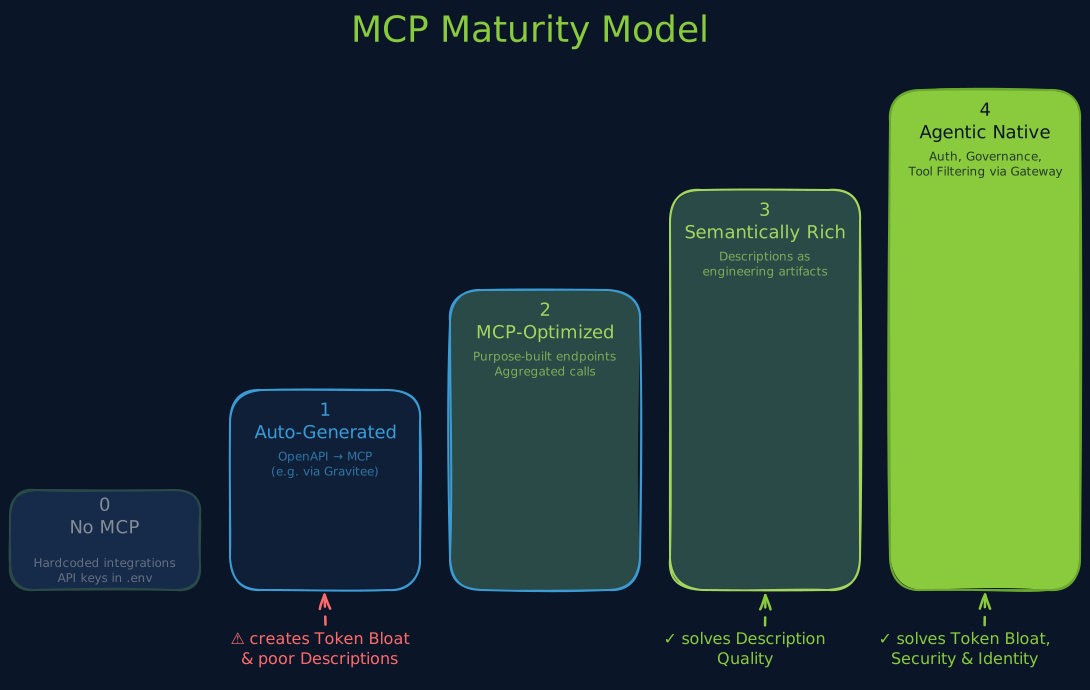
When we looked at these problems together, a pattern emerged. They’re not independent. They’re symptoms of adoption at different levels of maturity. So we built a framework — loosely inspired by the Richardson REST Maturity Model, one of the most cited API design frameworks in the industry.
| Level | Name | What it looks like |
|---|---|---|
| 0 | No MCP | Hardcoded integrations. API keys in .env. No standard protocol. |
| 1 | Auto-Generated | OpenAPI imported, tools generated automatically (e.g. via Gravitee). Zero effort, but all the problems above. |
| 2 | MCP-Optimized | Purpose-built endpoints. Aggregated calls, context-aware responses. Not a 1:1 mapping of REST operations. |
| 3 | Semantically Rich | Tool descriptions engineered for LLM selection accuracy. Prompt engineering at the tool level. Descriptions as first-class artifacts. |
| 4 | Agentic Native | Multi-agent flows. Explicit pre/postconditions. Built-in auth and governance via gateway. Tool filtering instead of tool flooding. |
The key insight: level 1 creates the problems. Levels 3 and 4 solve them.
At level 1, you import an OpenAPI spec with 80 endpoints and get 80 tool descriptions dumped into context. That’s where token explosion comes from. That’s where poor descriptions come from (they’re just the OpenAPI summaries, written for human developers). That’s where the identity problem starts (no governance layer, no filtering).
At level 3, you treat tool descriptions as engineered artifacts — optimized for how an LLM selects tools, not for how a human reads documentation. This directly addresses the description quality problem.
At level 4, you add a governance layer: tool filtering (only expose the 5 relevant tools per request, not 80), centralized auth, audit logging, rate limiting. This addresses token explosion, the credential problem, and security.
Most teams I talk to are at level 0 or 1. The gap to level 2 isn’t huge. Getting to level 3 requires a mindset shift — treating descriptions as code, not comments. Level 4 requires infrastructure.
What a gateway actually does for you
The gap between level 1 and level 4 is where an MCP gateway comes in. We work with Gravitee, which released protocol-native MCP support in version 4.8 and expanded it significantly in 4.10. I’m not going to pretend this is a neutral evaluation — we’re a Gravitee partner and we chose them for a reason. Here’s what a gateway like this concretely does:
Converts existing APIs to MCP without code changes. Import an OpenAPI spec, enable the MCP entrypoint, and agents can connect. That’s level 1 — but it’s the starting point.
Protocol-aware traffic management. The gateway doesn’t treat MCP as generic HTTP. It understands tools/list, tools/call, prompts/list at the method level. That means rate limiting, caching, and analytics that actually understand what’s happening. tools/list responses can be cached. tools/call can be rate-limited per agent. Tool descriptions get cached; tool executions don’t.
Centralized identity. This is the answer to the credential-zoo problem. OAuth 2.1 with Dynamic Client Registration, PKCE, audience enforcement, short-lived tokens. Agents authenticate through the gateway; they never see downstream API keys. Someone leaves the company? Revoke their token at the gateway. Done.
Fine-grained authorization. Since version 4.10, Gravitee supports OpenFGA integration (relationship-based access control) and an AuthZen Policy Decision Point for real-time allow/deny decisions. You can restrict which agents may discover which tools — not just which ones they can call.
Observability. Which tools are agents actually calling? How often? With what error rates? Without a gateway, you’re flying blind. With one, you get the same visibility you’d expect from any production API.
None of this is MCP-specific innovation. It’s API management applied to a new protocol. Which is exactly the point — MCP servers shouldn’t have to reinvent auth, rate limiting, and observability themselves.
What this means in practice
If you’re evaluating MCP for production use, here’s the condensed version:
Don’t deploy raw. Put a gateway in front of your MCP servers. You wouldn’t expose a REST API to the internet without one, and the same logic applies here.
Know where you stand. Most teams are at level 0 or 1 in the maturity model. That’s fine as a starting point, but be aware of the problems that come with it. Plan your path to level 3.
Treat descriptions as code. The biggest bang for the buck is investing in tool description quality. Test them. Iterate on them. Measure selection accuracy. This is prompt engineering at the infrastructure level.
Limit tool exposure per request. If your agent sees more than 10 tools, you need filtering — whether that’s a gateway, an orchestration layer, or both.
Lock down identity now. The credential-zoo problem only gets worse as you add more agents and more servers. Centralize auth before it becomes an incident report.
MCP is the right infrastructure. What’s missing is the maturity to use it well. The protocol will keep evolving (the MCP Dev Summit is April 2–3 in New York, and the tool versioning proposals SEP-1575 and SEP-1400 are still in progress). In the meantime, the maturity model gives you a framework for making deliberate choices instead of discovering the problems in production.